
Original AI-generated editorial illustration, not an official launcher screenshot, game character or gameplay image.
Updated November 6, 2026. The Final Closed Beta begins November 25 on PC, Android and iOS. Recruitment is open, but access is limited to selected applicants and progress will be wiped after the test. Read the confirmed schedule and spring 2027 launch update.
HoYoverse's September 4 announcement added launcher pre-registration and an optional setting that starts the download when the game releases. The July Evolution Test was a separate program for selected players, and its published play period has ended. If you are looking for a Honkai Nexus Anima download, check which program a link belongs to before downloading a client or paying anyone for access. HoYoPlay announcement · Evolution Test access notice
At a glance
| Action | Actual effect | Does it grant play access? |
|---|---|---|
| Install HoYoPlay | Provides the official game launcher | No |
| Pre-register | Records interest; optional auto-download starts at release | No |
| Receive a named test invitation | Makes an account eligible under that test's rules | Only for that named test |
| Use the eligible client in its play window | Allows entry to that specific available build | Only while its rules and window permit |
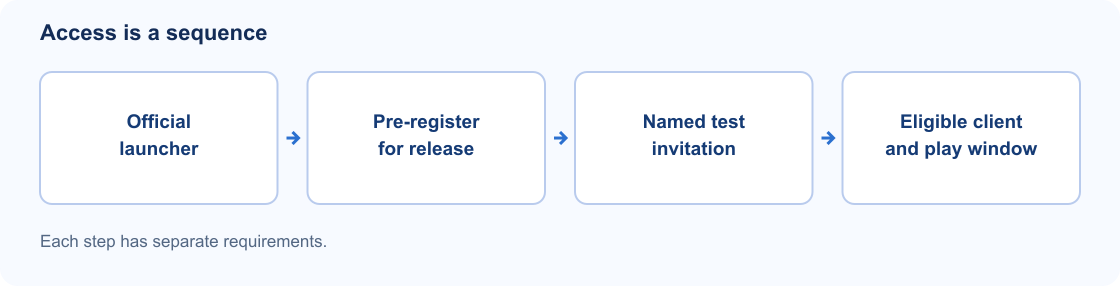
Original diagram of the steps from launcher to test access; not an official UI or evidence of a playable build.
Honkai Nexus Anima Download: Pre-registering through HoYoPlay
To pre-register in HoYoPlay:
- Open HoYoPlay and check Settings → About to confirm the launcher is up to date.
- Open All Games and select Honkai: Nexus Anima.
- Choose Pre-Register Now and sign in with your HoYoverse Account.
- Decide whether to enable automatic downloading when the game releases.
If you still need the launcher, get it from the official HoYoPlay website, which is where the announcement links. The Honkai Nexus Anima download setting is optional and starts the download when the game releases. It is not a beta download and not a test invitation. Official September 4 instructions
What each step actually means
1. Installing the launcher
HoYoPlay is a tool for managing supported games. Having it installed does not make every game listed inside it playable.
2. Pre-registering
Honkai Nexus Anima download pre-registration records your interest. Keep the confirmation, but it is not a tester selection email.
3. Receiving test access
For the Evolution Test, HoYoverse picked participants from registered applicants who had filled in its questionnaire. The FAQ said qualifying players would get download instructions by email or other official channels, and that the access result shown on the official website took precedence. Those rules applied to that test. Evolution Test FAQ
4. Entering an available build
Even an official Honkai Nexus Anima download requires an eligible account, supported platform and active play window. Check those first. Reinstalling cannot reopen an ended test or create an invitation.
What happened to the Evolution Test download?
The global schedule ran from July 9, 2026 at 10:00 to July 27, 2026 at 18:00, UTC+8. Treat it as an archived test, not a download opportunity. Official tester notification schedule
The recruitment notice said access applied only to that test and would not carry into later ones. It tied access to the first device used on each approved platform and banned transfers or sales of clients and test accounts. A screenshot of July qualification cannot establish access to a later build. Official recruitment notice
Dates and application details are in our Evolution Test archive.
Does the Chinese Phase 3 notice change this?
The September 17 Chinese announcement is about 位面探索计划, the Aspect Exploration Project. Its FAQ describes a small confidential testing program and explicitly separates it from the Evolution Test and the Nexus Bond Test. Applicants are chosen in batches, so submitting the questionnaire is not an invitation. Official Chinese Phase 3 notice
The CN notice does not announce an open global download. If a link claims to offer a shortcut into this program, compare it with the regional notice, account requirements and invitation process. A translation does not change which program the notice covers.
Before using a Honkai Nexus Anima download link, find the official notice for the exact test it claims to open. If the notice does not match, do not install the client.
Checking a download or invitation safely
Before opening a Honkai Nexus Anima download or entering account details:
- Start from an official page. Go through the game's official website or a known official announcement rather than a search-result download button.
- Read the date and the named test. A valid July guide can be obsolete by October, and a fresh date on a fan article does not refresh the test it links to.
- Check access yourself. If the relevant notice offers an account-status check, open it through the official site. An email screenshot or a seller's word is not enough.
- Keep credentials private. Never hand passwords or one-time codes to anyone offering to register or activate the game for you.
- Decline paid workarounds. HoYoverse's Evolution Test notice warned against account sharing, trading, renting and sellers of test installation packages. Official account-trading notice
For the Evolution Test, the published notification address was [email protected]. That is a historical reference, not a promise that future campaigns will use the same sender. A sender display name can be faked. Open the official page yourself to confirm the result. Official sender information
What if an official installer throws an error?
If a Honkai Nexus Anima download throws an error, first confirm you are using the right build inside an authorized play window. Then note the exact error, launcher version, operating system and free storage before contacting support.
The July Evolution Test Launcher FAQ covers that test's installation issues and lists [email protected] for customer support. Its hardware section gives recommended specifications for the test, not final release requirements. Keep that in mind when comparing your device against older guides. Official launcher FAQ
For any Honkai Nexus Anima download, skip community "unlockers," replacement executables and requests to turn off security software. If the official client fails, send support the exact error and your eligibility details rather than trying another mirror.
Sources
All sources below were checked on October 15, 2026, Australia/Melbourne. Where HoYoLAB pages showed a loading screen, we checked their text and official account certification through HoYoLAB's public article API.
- September 4, 2026: Honkai: Nexus Anima Pre-Registration Now Open on HoYoPlay
- June 22, 2026: Evolution Test recruitment announcement and Evolution Test FAQ
- July 6, 2026: Global tester notification schedule and Evolution Test Launcher FAQ
- July 9, 2026: Third-Party Plug-Ins & Account Trading Notice
- September 17, 2026: Chinese Aspect Exploration Project Phase 3 announcement
1 thought on “Honkai Nexus Anima Download: 7 Safe Access Checks”